
M‑Care Suite / Billing & invoicing

Invoice every client for the month at the press of one button.

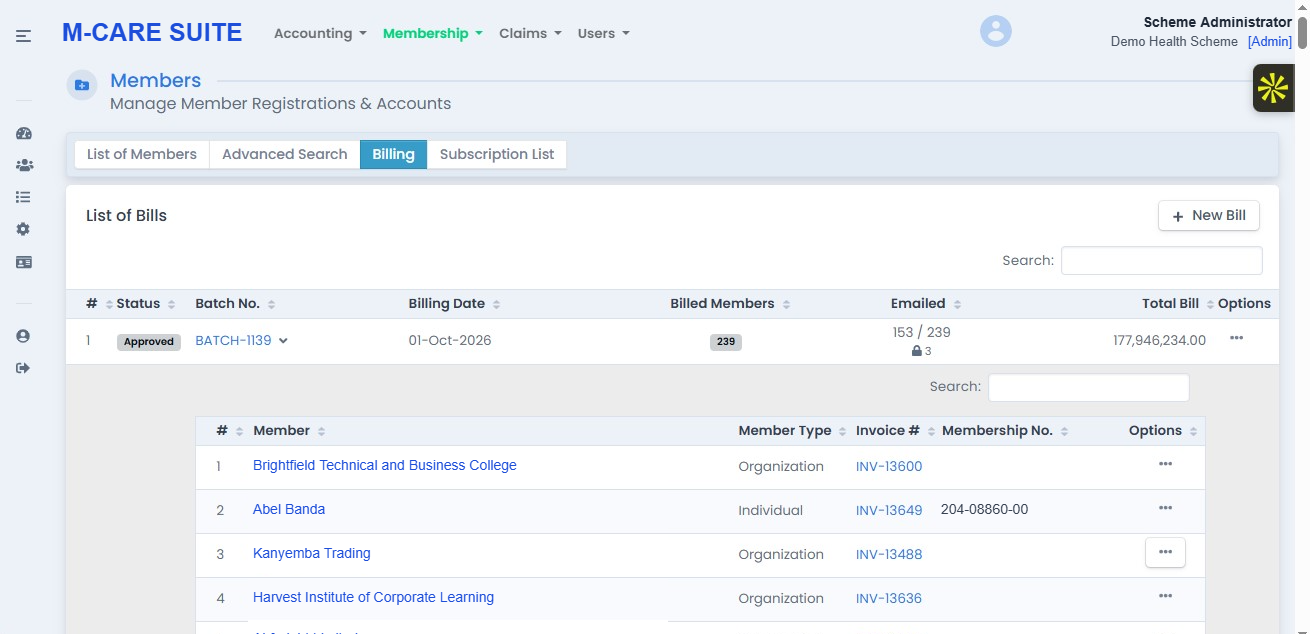
You cover organisations that have members under them, and individual clients who have their dependants under them. Both have to be invoiced for the period. Choose the month and press the button: the system makes an invoice for every organisation and every individual client from today's member list, and emails it to the right person with the list of members it covers. The hospital subscriber list is a separate run, sent on the rules you agreed with each client.
In the free trial we invoice a month you have already invoiced, so you can compare. Nothing is sent to anyone.
The monthly invoice run — organisations and individual clients in one batch (sample data)

The current way

Invoicing takes two weeks, and it is still wrong

Every invoice depends on knowing exactly who was covered on a given day. Typed by hand from a member list printed days earlier, it never quite is.

Current way
Invoices are typed one client at a time from a member list printed the week before.
Consequence
Invoicing eats days every month, and the invoice includes people who joined or left after that list was printed.
Bigger problem
You charge too little for new members and too much for old ones, then spend next month writing credit notes instead of collecting.
Current way
Organisations are invoiced from one list and individual families from another.
Consequence
Individual clients are invoiced late, or missed altogether.
Bigger problem
The part of your book that pays for itself month by month is the part you chase least.
Current way
Hospital subscriber lists are emailed as spreadsheets when somebody remembers.
Consequence
The hospital works from an old list, or from one that includes clients who have not paid yet.
Bigger problem
Treatment is given to people you no longer cover — or never started covering — and you are left arguing about who pays.
Current way
Invoices and statements are sent from personal inboxes.
Consequence
Nobody can say what was sent, to whom, or whether it arrived.
Bigger problem
Chasing payment starts with proving the invoice exists — the weakest place to chase from.

How it works with M‑Care Suite instead

One button does the whole month

Invoicing stops being two weeks of typing. The system builds the month off today's member list, and you check it before anything leaves the office.

Set up
You put your prices, dates and contacts in once
What you charge per plan, per organisation and per individual client, the day of the month you invoice, your invoice layout, and the right contact for each one — a finance office for an organisation, the member themselves for an individual family. The wizard takes you through it.
Price per plan
Invoice dates
Contacts saved
Result
The run already knows who to invoice, for how much, and where to send it.
Stop doing
No lists to print, no invoices to type
The system reads the member list as it stands on the invoice date, so joiners, leavers, new dependants and suspensions are already counted — and part‑month members are charged part‑month if that is your rule.
Today's members
Part‑month charges
No printing lists
Result
Invoices match who was really covered.
One button
Every organisation and every individual client invoiced
In one run, each organisation gets its invoice with the list of members it covers, and each individual client gets theirs with their dependants. Both are emailed to the contact you saved, and both appear on the client's own page in M‑Care Suite.
Organisations invoiced
Individual clients invoiced
Emailed and on their page
Result
A month of invoicing is finished in minutes, and you can see every single thing that was sent.
They pay
Every invoice carries a pay-by-card link
The invoice email includes a secure Stripe link, so an organisation or an individual family can pay by card or bank debit the moment they open it. The payment is matched to the invoice on its own, and a receipt goes out without anyone typing it.
Card or bank debit
Matched automatically
Receipt sent
Result
Clients pay the day they are invoiced instead of the month after.
Separate run
The hospital subscriber list goes out on your rules
The subscriber list is sent to the hospitals on its own, usually at the start of the period. Whether a client has to have paid before the period starts, or may still be unpaid up to an agreed date inside the period, is set per organisation and per individual client — and the run only includes the clients whose rule is satisfied.
Paid before the period starts
Or unpaid until an agreed date
Set per client
Result
Nobody appears on a hospital list before your agreement with them says they should.
You get
One place that answers every invoice question
Every invoice, the members behind it, what was sent, when and to whom, what is still unpaid and how old it is — and it all goes straight into the same books as the claims.
Proof of sending
Invoice to members
Who owes what
Result
You answer a client's question in seconds instead of searching someone's email.

Worried about changing your invoicing?

It's the one thing that cannot go wrong. Here's how M‑Care Suite keeps your invoices, your hospitals and your clients exactly as they are.

You might be thinking
“Our invoice must look exactly the same.”
What we do
Your own invoice becomes the layout.
Set your layout and carry on your own numbering, so the organisations and individual clients you cover see no change. Send us a current invoice and we will help you match it.
Layout and numbering set before you try it.
You might be thinking
“We cannot have a new system emailing our clients.”
What we do
Nothing is sent until you say so.
Every run is made, checked and compared first. In the free test run nothing is sent to anyone at all.
Every run waits for your approval.
You might be thinking
“Our hospitals will not use another website.”
What we do
They still get the subscriber list the way they get it now.
Hospitals keep receiving their subscriber list by email at the start of each period. The page is simply there for the ones who would rather look it up than search their inbox.
Email and portal, both included.

Invoice a month you have already invoiced, and compare

Set up one of your schemes, invoice a past month, and check the invoices, the amounts and the hospital lists against what you actually sent.

In the free trial we invoice a month you have already invoiced, so you can compare. Nothing is sent to anyone.
The other jobs in M‑Care Suite
One member record you can rely on
How this saves you money →
Pay only what your rules and prices allow
How the system protects your money →
Full accounting, from quotation to financial statements
See the accounting behind it →